Welcome aboard to the our video site for sailors. We are being constantly blasted by scammers and pirates, so registration is invite only
contact@sailorsahoy.com with "Invite". No spam, no newsletters. Just a free account
निकर सृजन करना

0
0
0
0
45,989
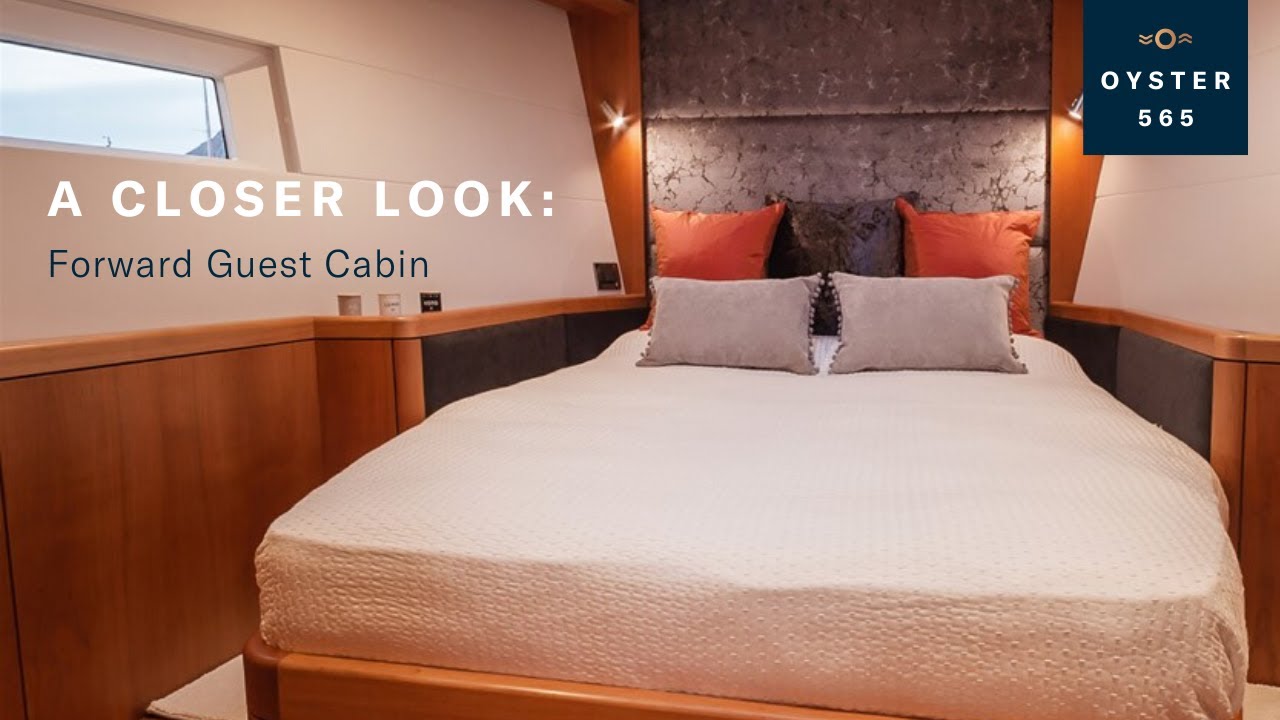
Take a tour of the Oyster 565's forward guest cabin. The signature window allows the cabin to be flooded with natural light, making it airy and luminous. The cabin features wide storage, air conditioning and soundproofing. The Oyster 565 is a sub-60-foot sailboat, designed to be sailed shorthanded by a couple or family. Boasting many of the features you would expect on a larger bluewater sailing yacht, she is capable of everything from a coastal cruise to circumnavigating the globe without the need for a professional crew. Discover more about the Oyster 565 here: https://bit.ly/3BivqJt #OysterYachts #Oyster565 --------------------------------------------------------------------------------------- Oyster Yachts are builders of the world's finest bluewater sailboats. A thoroughbred British luxury sailing yacht builder, we have designed, built and supported the world’s finest liveaboard sailboats since 1973. The DNA of our 50 to 90-foot ocean cruising yachts is rooted in over 20 million bluewater sailing miles and more than 90 sailing circumnavigations. We use this experience to refine our explorer sailing yachts so they can take you anywhere in the world in complete luxury, comfort and safety. Contact for enquiries: sales@oysteryachts.com UK: +44 (0)1473 358317 US: +1 401 846 7400 --------------------------------------------------------------------------------------- Subscribe to our channel: https://bit.ly/3BB1aLg Visit our website: https://bit.ly/3QJxiRb Like us on Facebook: https://www.facebook.com/oysteryachts Follow us on Instagram: https://www.instagram.com/oysteryachts/

0
0
0
3,085

46 meter Benetti Motoryacht MISTRESS - Asking Price : Euro 4.995.000 Mistress, a classic Benetti Shipyard 45 metre craft, reflects the owner’s profound love for traditional values, praticality and hospitality. The essential theme is confort and luxury, expressed through a generous use of space, perfectly matching the elegant boisseries and Versace furnitures. The result is a unique megayacht inimitable in its design and classic in its decor. With its sleek line and balanced proportions, evoking a world of harmonious beauty, her living spaces are delightfully warm and refined. Mistress is design for accomodating up to 9 guests in 5 cabins in the lower deck plus 2 in the master bedroom on the main deck, all with private bathroom and wardrobes. The finishings of the guest cabins are in contrasting colours in walnut. Mistress its design for fitting 10 crew on board. Designed for long distance cruising, “Mistress” was fitted on the flying bridge with Jacuzzi and a barbeque dining area. A gym and sauna room are located on the lower deck. All the equipments for scuba diving and snorkeling are also provided. Additionally, there are a large tender and two water bike on the upper deck. In sky lounge bar, you can find a huge flat screen TV equipped with karaoke system and media entertainments. All the bedrooms are fully equipped with TV’s and DVD players. TOYS N. 2 Jet Skys Sea Doo Sparc 2up Tender with Engine 115 cc Envinerude N. 2 Kayak N. 2 Kit for Scuba Diving Kit for Snorkeling DINING AREA Mistress is tought for corporate and family daily events. Counting all the dining areas you can serve up to 40 or more guests for dining on board. On the main deck there are 2 dining areas, one inside the living room that can seat up to 10 guests and outside of the main deck open area where there is a dining table that can fit up to 8 guests. On the upper deck open area there is a dining table that can accomodate 10 guests and on the sky lounge indoor dining with maximum 6 person capacity. The flying bridge barbecue dining area comes with a table which can be used for 8 guests both for aperitives and dinner. TECHNICAL DETAIL ENGINES MTU 2000x2 serie 396 N. 2 Caterpilar 125 kw Depurator Fuel Aman Black Water Fuel Tank 49 m3 Dirty Oil 1300 Lt Lube Oil 1300 Lt Water Tank 10 m3 Gray Water Tank Aft 1300 Lt Grey Water Tank Fwd 2400 Lt NAVIGATION SYSTEM Radar Furuno Radar Simrad N. 2 VHF DSC SEA 7157 Gyro Furuno Ais Furuno GPS Navigator Furuno Meteofax Cartographic Nobeltec Imarsat Miniemm Furuno SSB System Scanti Nerara Sat (Satellitar Phone) Antenna Sat Antenna Internet N. 2 Bow Winches N. 2 Stern Winches N. 2 Crane for Tender ENTERTAINMENT Gym Sauna Wi Fi Music System 8 Televisions Karaoke System Jacuzzi Mini Bars AREA LOWER DECK All the 5 guests cabins with their own bathrooms are located on the lower deck. There is a spacious crew area with 4 cabins that can contain 9 crew, utilities rooms such as the laundry and ironing room, and the engine room together with its control room. MAIN DECK Through the main deck you can access to gym area where there is also a sauna and a toilet.On the inside you can find a spacious living room, a dining area and the kitchen. The master bedroom is located on the front of the main deck with a wardrobe and 2 toilets for him and for her. UPPER DECK The sky lounge in the upper deck, provides guests with an ideal space for relaxation, table games, television and music. The captain room with the command area its located on the front of the upper deck. FLY BRIDGE You can access to the flying bridge from the upper deck and you will find a dining area and a jacuzzi.

0
0
0
312

The PC50 is our entry-level power catamaran, the smallest in the PC range. She may appear deceptively petite when compared to her glamorous bigger sisters, the PC60 and PC76, but she packs a punch for her size. The elegant styling is neither simple nor complex, but rather a fusion of modern and chic, exuding confidence. Built using the patented SCRIMP resin infused system ensures a superior structure, both lighter and stronger than traditional build methods. The PC50 is built more towards a production style to ensure attractive pricing, giving all cruisers the opportunity to enjoy Horizon Yachts International award winning quality. The 3-cabin owners layout has the entire starboard hull dedicated to the owner and includes a Queen size bed, large full height closets, vanity, privacy door and large en-suite bathroom with separate shower. The big hull side windows with integral opening portlights plus the overhead deck hatch ensure plenty of natural light and ventilation, limiting the use of the air conditioning while anchored off a beach or at the dock. The en-suite VIP cabin is forward in the port hull and has a Queen bed, plenty of storage closets and cupboards, large hull side windows and opening portlights plus overhead deck hatch offer plenty natural light and ventilation. The guest cabin, with two twin beds, is aft in the port hull and shares the VIP bathroom. The galley and salon are on the main deck level and offer an open plan arrangement that flows and integrates beautifully. The galley offers two large fridge / freezers, a 4 plate cooktop, double basin, convection microwave oven, bar area with two stools and ample storage space. The galley has an opening window to the cockpit bar. The salon seating is very comfortable with two home-style sofas, coffee table and side table. The desk area, adjacent to the salon, is a neat feature that gives the owners a dedicated office space for a laptop & printer. The desk chair swivels to double as a salon seat. The aft deck is very well proportioned and offers comfortable lounging seating, dinning for up to 8, a bar area with two stools and counter with storage cabinets below. The side boarding doors make boarding the PC50 very comfortable and accessible to all. The flybridge is accessed via stairs from the aft deck and offers a large area for entertaining and relaxing, with comfortable seating for 6 plus a large sunbed ahead of the helm consul, which has a double helm bench seat with storage below. The flybridge is equipped with a basin, icemaker, fridge and space for a BBQ. There is ample space for a 12ft tender and crane for the owners that cruise with a dingy. The flybridge can either be fitted with or without a bimini, or the option for a hardtop is available. The foredeck has two bow seats and large sunning beds. The anchor windlass is accessed via a flush deck hatch. There is additional storage via hatches adjacent to the anchor plus two bow deck hatches. The PC50 is designed to appeal to the cruising yachtsman that has specific needs and is looking for certain key elements and features that the PC50 offers, namely: Highly fuel efficient at a cruise of 18 -- 20 MPH Soft, comfortable, smooth level ride Large stable platform A strong and dependable yacht, professionally designed and built, utilizing the patented SCRIMP™ resin infused system Easy and safe to manage and maneuver using the pods and joystick controls, giving the captain total confidence to have complete control of the vessel Very spacious accommodations with all the necessary amenities for long term cruising and for living aboard Low maintenance through the use of the highest quality marine equipment and durable materials on interior finishing details Large comfortable aft deck, flybridge and deck areas for dinning, sunning and entertaining Easy and safe water access Very aesthetically appealing, ensuring pride of ownership and retaining resale value For more information please contact Horizon motor Yachts Australia on 07 5577 9009 or visit our website www.hmya.com.au
0
0
0
1,018

0
0
0
845

0
0
0
0
2,303
