close

Welcome aboard to the our video site for sailors. We are being constantly blasted by scammers and pirates, so registration is  invite only


contact@sailorsahoy.com with "Invite". No spam, no newsletters. Just a free account

निकर सृजन करना
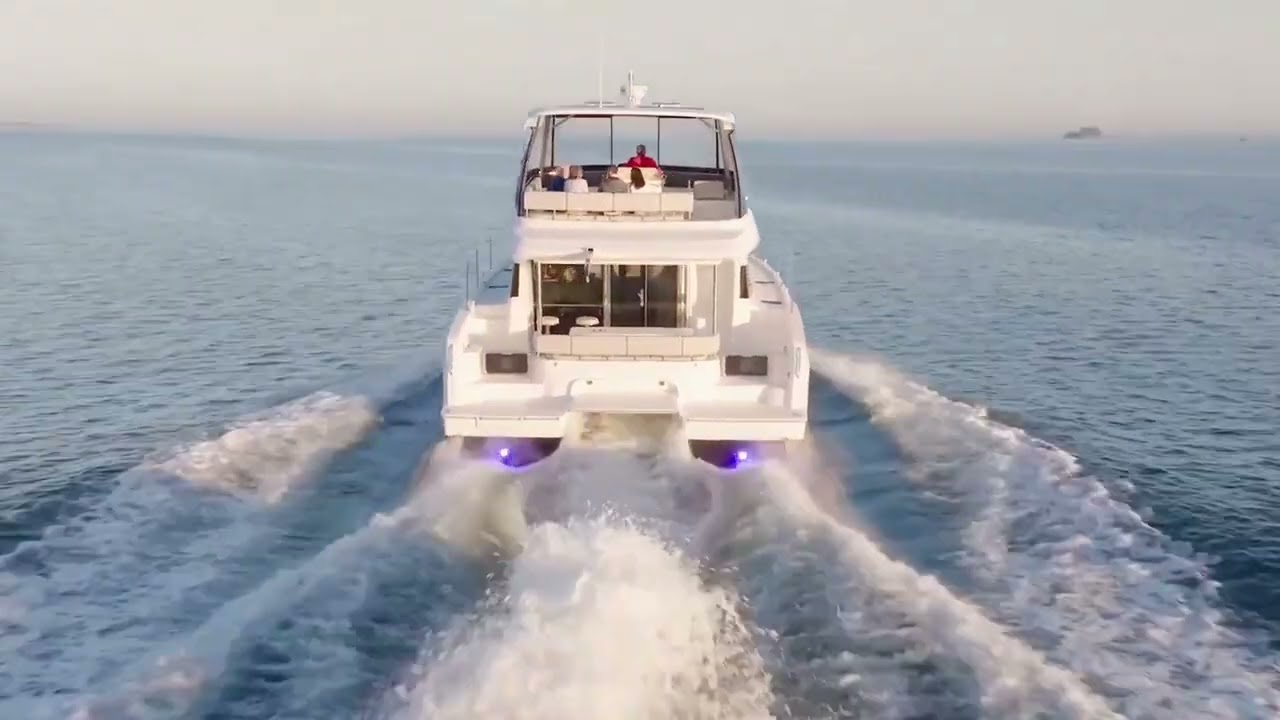
Alexander Marine as Aquila Power Catamarans Dealers are pleased to present this Aquila 42 Yacht Power Catamaran. Surging ahead of its competitors, the boat you've been envisioning awaits. The Aquila 42 Yacht Power Catamaran comes fully equipped with features bound to bring joy to any boating enthusiast, whether your adventures take you near or far. This 42 Yacht is meticulously crafted to meet CE Certification Category A standards and is designed by the renowned power catamaran design firm VPLP Design, ensuring both safety and seaworthiness. With advanced electronics packages, operating this boat is a breeze, and it's certain to evoke envy from your friends. The engine options from Volvo Penta are not only exceptionally efficient but also easy to maintain. For the comfort of your guests, the yacht boasts three alfresco entertainment areas complemented by a full galley and wet bar. After all the activities, various stateroom options are available to align with your specific boating lifestyle. Disclaimer: All specifications in this presentation are provided for information only and particulars herein are obtained from sources believed to be correct, but not guaranteed. Buyers should satisfy themselves with respect to accuracy. To find out more or to talk to one of our Yacht Sales Executives, visit www.alexandermarineaust.com.au or call +61 (0)7 5618 0000.

alexandermarineaustralia7163

0

0

155

While having been in the "gamle by" in Arhus I took the chance to use my Ricoh Theta V camera in order to make some 360° footage. Afterwards I tried out my workflow to get the spatial audio through my Cyberlink PowerDirector video processing. Workflow: 1. Connect Theta V via USB to your computer 2. Copy the video(s) to you computer (e.g. d:\temp\) 3. Start the "RICOH THETA" app 4. Drag'n'drop the video file(s) (you can select more than one video file) from your computer location (e.g. d:\temp\) onto the "RICOH THETA" app window (or just use open from the file menue) 5. Let the "RICOH THETA" app stich your video(s). It will output a file at the same location (e.g. d:\temp\) with the filename being extended by "_er" (the filename extension is still ".mp4") 6. Drag'n'drop the video file (unfortunately one by one) from your computer location (e.g. d:\temp\) onto the the "RICOH THETA Movie Converter" app icon (e.g. the one on the Desktop) 7. Let the "RICOH THETA Movie Converter" app convert the dropped video file. It will output a file at the same location (e.g. d:\temp\) the same name but the extension ".mov" 8. Open "Cyberlink PowerDirector" go to settings and make sure that under general you configure the used audio channels to "5.1 Surround". 9. In "Cyberlink PowerDirector" import the processed video file(s) with the extension ".mov". 10. In "Cyberlink PowerDirector" drag your video file(s) with the extension ".mov" to the timeline of your 360° project. 11. After editing (avoid changing the audio channel(s) of the Theta V videos except cutting, fading) produce a 360° video with enabled "Surround-Sound" and "Dolby Digital 5.1" 12. Start the "Audacity" app and open the 360° video file produced by "Cyberlink PowerDirector" in it (or just drag'n'drop the file to the desktop icon). You will experience 6 audio channels. 13. In "Audacity" go to "Edit" "Settings" and make sure that for "Import / Export" and "Export of audio" the tick is set for "use own mix" (and no tick for downsample to mono/stereo). 14. In "Audacity" export these audio channels by using "File" / "Export" / "Audio export" (same as CTRL-Shift-E). Change the filename to make it same as the video filename (besides the file extension), leave "WAV (Microsoft) signed 16bit PCM" and press "Save". 15. Now you get an additional selection box. Change the slider to output of four audio channels first. Then you need to edit the lines from the boxes of the left hand side to the boxes on the right hand side. Make left1 being connected only to right1. Make left2 being connected only to right3. Make left3 being connected only to right2. Make left5 being connected only to right4. Now press ok twice. 16. Now we need to replace the audio track of the produced video of "Cyberlink PowerDirector" with the one generated by "Audacity" by using "FFQueue". 17. Start the "FFQueue" app (remove all old jobs if there are some) press the "Add" button and select the produced video of "Cyberlink PowerDirector". Because the audio file has the same filename it will be recognized automatically. You will get three entries in the list. #1.0 video (leave it ticked) #1.1 audio (untick it) and #2.0 audio (leave it ticket). 18. In the "FFQueue" app verify that the FFMPG command line states "%inputs% %preset% %output%" and Preset command lines states "Passthrough". Set the output filename and path and make sure the file extension will be ".mov". Then you can press "Save job". Afterwards press the triangle button "Start". 19. Start the "Spatial Media Metadata Injector". Use the "Open" button to select the file generated by "FFQueue". "My video is spherical (360)" shall be ticked by default. Now you need to tick also "My video has spatial audio (ambiX ACN/SN3D format). Then you need to press "Inject metadata". 20. The "Spatial Media Metadata Injector" app generates a new file with extending the source filename by adding "_injected". The fileextension will stay the same. 21. Upload the file generated by "Spatial Media Metadata Injector" to YouTube. 22. Now you should have audio focussed on the direction you are viewing...

sixten828

0

0

31

0

sailinglover

0

0

6,270

0

caribbeancatamaransailing

0

0

792

Step aboard and relive the magic of our unforgettable adventures. This is more than a sailing adventures, it’s a voyage of connection, wonder, and discovery. Swim alongside graceful sea turtles in crystal clear waters. Snorkel beside gentle whale sharks an awe inspiring encounter that stays with you forever. Watch as the sun dips below the horizon and thousands of bats rise into the twilight sky in one of nature’s most surreal spectacles. Feel the rhythm of ancient traditions as we dance with local communities, share stories, and are welcomed with open hearts. From vibrant coral gardens to the quiet beauty of remote islands, every moment is filled with life, color, and soul. 💛 To our incredible guests, thank you! Thank you for trusting us with your time, your spirit of adventure, and your curiosity. Your presence brings these journeys to life, and we are endlessly grateful to be part of your story. 🗺️✨ Can you imagine it? The salt in the air, the sound of laughter, the thrill of discovery... This is your invitation to explore, to feel, and to connect with nature, with people, and with the extraordinary world beneath the surface. 🌿 Let the adventure begin. 🎥: Dani Mulyana & Tinae Siringo Ringo #SailingAdventure #WhaleSharks #SnorkelingWithTurtles #EcoTravel #SeaTrekSailingAdventures #BucketListTrip #TravelWithPurpose #OceanExploration #UnforgettableMoments #Sailing #FamilyAdventure #WhaleShark #WhaleSharkEncounter #UnderwaterAdventures #Underwater #Snorkeling #CoralReefExplorer

seatrekbali

0

0

176

The SailGP finale is right around the corner 👀 Will you be tuning in? 📺 #SailGP

worldsailingtv

0

0

217